Automatic Search Pro for Model Quantization#
Overview#
Auto Search Pro is an optuna-based, highly configurable, parallel hyperparameter optimization system designed to automate the search for optimal quantization strategies. It supports hierarchical conditional search space and allows fine-tuned control over both the quantization algorithm and its parameters.
Design Overview#
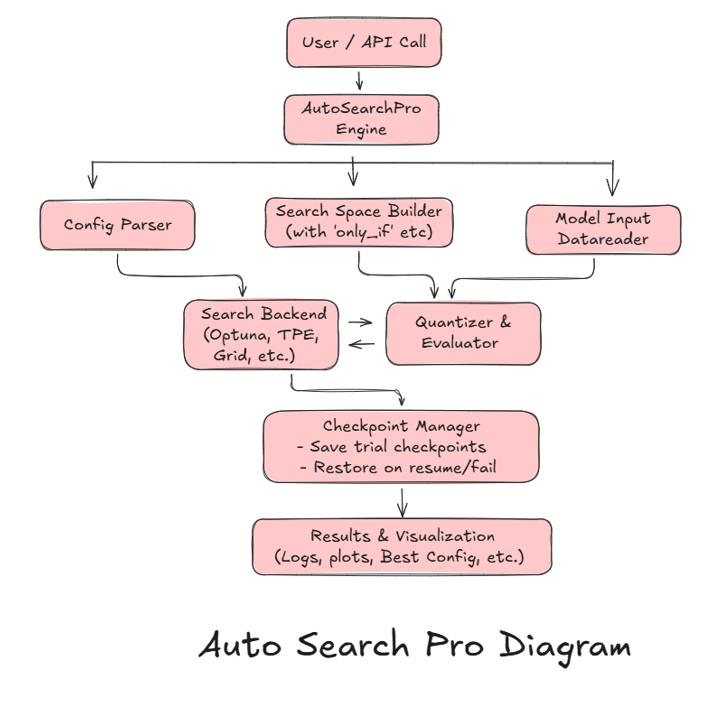
Auto Search Pro is built around the following principles:
Hierarchical and conditional search space
Many real-world optimization tasks require nested and conditional parameters. Auto Search Pro supports complex parameter dependencies via ‘only_if’ constructs.
Extensible by design
Supports plug-and-play evaluators, easy addition of quantization strategies, samplers etc.
Checkpoint and transparency
All search results are saved (configs, best params, plots) to a user-specified directory. Search can resume via SQLite checkpoints.
Features Summary#
Discover the powerful features that drive the efficiency and flexibility of our system. Each feature is designed to make hyperparameter optimization smarter, faster, and more intuitive.
🌲 Hierarchical Search
Description: Support for conditional and nested hyperparameter trees for advanced search strategies.
🧠 Custom Objectives
Plug in your own evaluation logic (e.g., model inference, custom metrics). Design your own evaluation logic that perfectly aligns with your specific needs.
🧪 Sampler Flexibility
Variety is the spice of optimization! Choose from a range of samplers.
Available Samplers: ‘TPE’, ‘Grid Search’, ‘Others’
⚙️ Multiprocessing
Parallel search efficiently with the power of optuna + SQLite. Take advantage of optimized parallelization to run multiple searches simultaneously, reducing time to solution.
💾 Checkpoint
Automatic resumption of interrupted searches by saving the SQLite DB. Don’t lose progress! Resume interrupted hyperparameter optimization from the last checkpoint.
📊 Visualization
Auto-generate plots to track your optimization journey and understand feature importance. View real-time visualizations that show your optimization performance and feature importance, making it easier to interpret results.
🔌 Config Centralization
All configuration is stored in a single Python dictionary for convenience. Centralize your configuration for easy management and version control.
📁 Output Saving
Store your results with ease for future reference or sharing. Automatically save the best configuration, study database, and generated plots for your analysis.
🛠️ Two-Stage Search
Experience-driven optimization based on the expertise of industry professionals. A two-stage search strategy designed around expert knowledge to find optimal configurations faster.
Pip requirements#
Install the necessary python packages:
pip install optuna
Quick Start#
To enable a quick start for auto search, we provide a set of predefined search spaces based on common scenarios, including: “XINT8_SEARCH”, “A8W8_SEARCH”, “A16W8_SEARCH”. With just a few simple steps, you can initiate an auto search.
import copy
from quark.onnx import AutoSearchPro, get_auto_search_config

def get_model_input():
    pass
    # return model_input_path

def prepare_datareader():
    pass
    # return calib_data_reader

# Get auto search config
# Available auto search config: "XINT8_SEARCH", "A8W8_SEARCH", "A16W8_SEARCH"
auto_search_config_name = "XINT8_SEARCH"
quant_config = copy.deepcopy(get_auto_search_config(auto_search_config_name))

# Prepare model and calibration data reader
quant_config["model_input"] = get_model_input()
quant_config["calib_data_reader"] = prepare_datareader()

# Start auto search
auto_search_pro_ins = AutoSearchPro(quant_config)
best_params = auto_search_pro_ins.run()
Flow Diagram#
Initialize auto search config and quantization config.
Build the search space based on the configuration.
Sample configurations using the search algorithm (grid or random search).
Apply the model quantizer to the selected configuration.
Evaluate the performance of the quantized model.
Repeat n_trials.
Usage#
To use the automatic search process for model quantization, you need to define the following:
Auto Search Config: This includes parameters like the number of iterations, expected time per configuration, tolerance levels, and the stop condition.
Evaluator: If using a custom evaluator, provide the test dataset and evaluation metric. Otherwise, the built-in evaluator will be used.
Float Onnx Model: This model is the target model to be quantized.
DataReader: Defines the calibration dataset for model quantization.
Example Configuration:
from quark.onnx import AutoSearchPro

base_config = {
        "search_space": {
            "activation": ["Int8Spec"],
            "activation_params": {
                "symmetric": [True, False],
                "calibration_method": ["MinMax", "Percentile", "LayerwisePercentile"],
                "only_if": "activation",
            },
            "weight": ["Int8Spec"],
            "weight_params": {
                "symmetric": [True],
                "calibration_method": ["MinMax"],
                "only_if": "weight",
            },

            "algorithms": ["adaquant", "adaround"],
            "adaquant_params": {
                "num_iterations": [10, 20],
                "learning_rate": [ 1e-6, 1e-3],
                "optim_device": ["cuda:0"],
                "infer_device": ["cuda:0"],
                "data_size": [1, 10],
                "only_if": {"algorithms": "adaquant"},
            },
            "specific_layer_config": [None],
            "layer_type_config": [None],
            "exclude": [None],
            "use_external_data_format": [False],
            "OptimizeModel": [False],
        },
        "n_trials": 20,
        "n_jobs": 1,
        "output_dir": "./output",
        "temp_dir": "./temp_dir",
        "search_algo": "TPE",
        "search_evaluator": None,  # Custom or built-in function
        "direction": "minimize",
        "base_framework": "onnx",
        "model_input": None,
        "calib_data_reader": None,
        "eval_data_reader": None,
        "load_study_if_exists": False,
        "two_stage_search": False,
    }

auto_search_pro_ins = AutoSearchPro(quant_config)
best_params = auto_search_pro_ins.run()
🧩 Parameter Descriptions
n_trials int (e.g., 20): Number of optimization or search trials to run. Each trial typically tests a different set of parameters or configurations to find the best result.
n_jobs int (e.g., 1): Number of parallel jobs (processes) to run simultaneously. Set to 1 for serial execution; increase for faster, parallelized search.
output_dir str (e.g., "./output"): Directory where results, logs, and best configurations will be saved.
temp_dir str (e.g., "./temp_dir"): Temporary working directory for intermediate files, cached models, or temporary artifacts during the search.
search_algo str (e.g., "TPE"): Search algorithm used for parameter optimization. Common choices: "TPE" , "Random", or "Grid".
search_evaluator function or None: Function or callable used to evaluate each configuration. Can be a custom metric or a built-in one. If None, a default evaluator is used.
direction str ("minimize" or "maximize"): Specifies whether the optimization goal is to minimize or maximize the evaluation metric. Example: minimize loss, maximize accuracy.
base_framework str (e.g., "onnx"): Indicates which model framework or runtime is being used. Examples: "onnx", "pytorch" (coming soon).
model_input Any or None: Input model or its path. Can be an ONNX model object, a file path.
calib_data_reader Any or None: Data reader used to provide calibration data (e.g., for quantization or tuning model parameters).
eval_data_reader Any or None: Data reader used for evaluation — typically validation or test data used to compute accuracy, loss, or other metrics.
load_study_if_exists bool (True / False): If True, reloads an existing optimization study (previous search results) instead of starting a new one. Useful for resuming long searches.
two_stage_search bool (True / False): Enables a two-phase optimization process Calibration and FastFinetune.
Components#
Search Space
The search space defines the set of possible configurations that Auto Search Pro can explore. It is the heart of the optimization process and it support: Hierarchical structure: parameters grouped under different parts like ‘weight’, ‘weight_params’, ‘activation’, ‘activation_params’, ‘algorithms’ etc. Conditional selection(‘only_if’): parameters only activate if certain conditions are met to avoid invalid search space. Extensibility: Easy to plug in new models, algorithms, and settings. Dict-based config: Configuration is centralized in Python dictionaries (instead of YAML/JSON) for flexibility and programmatic control.
Notes:
1.Top-level search parameters (level-1) must be defined using Python lists. Valid: “weight”: [“Int8”, “Int16”, “BF16”] Invalid: “weight”: {“type”: “categorical”, “choices”: […]}
2.Nested (level-2) parameter spaces may be defined using either Python lists or dictionaries. When using TPE samplers (default) or other samplers, both formats are supported. However, when using a Grid sampler, all parameter values (at all levels) must be Python lists.
3.For conditionally active parameter groups (e.g. “adaquant_params”), you must explicitly define an “only_if” condition within that group to control activation.
Example:
base_config = {
        "search_space": {
        "adaquant_params": {
            "only_if": {"algorithms": "adaquant"},
            "num_iterations": [10, 20],
            }
        # other search space
        }
        # ... other auto search configs
    }
4.Even if a parameter group contains only a single fixed value, it must still be explicitly included in the search space to ensure consistent behavior across configurations.
Example:
“exclude”: [“sub_graph1”]
This allows all trials to respect that constraint.
Search Algorithm
The search algorithm samples configurations from the search space based on the defined priorities and search history. Currently, supported search algorithms are:
Grid Search: Exhaustively explores all configurations in a structured manner, ensuring a complete search of the space.
Other Search: For now “TPE”, “Random”,”CmaEs”,”GPS”,”NSGAII”,”QMC” are supported, and its reference:https://optuna.readthedocs.io/en/stable/reference/samplers/index.html
Evaluator
After the model is quantized, the evaluator assesses its performance based on certain metrics. There are two possible evaluation scenarios:
Custom Evaluator: If you provide an evaluator, it is used to measure the performance of the quantized model. The evaluator is expected to include a test dataset, execution runtime details (such as ONNX model execution), and a metric for evaluation (for example, accuracy, inference speed).
Built-in Evaluator: If no custom evaluator is provided, the built-in evaluator is used. This evaluator relies on a test dataset (for example, a pre-defined datareader for quantization tasks) and calculates metrics like L1 or L2 norm to evaluate the model’s performance.
The evaluator returns the evaluation results, which are then used to guide the search process.
Stop Condition
The stop condition evaluates the results provided by the evaluator and determines whether the search process should terminate. There are several criteria for stopping:If the maximum number of iterations or time allocated for the search process is exceeded, the loop is also stopped.
The stop condition ensures that the search process concludes either when a satisfactory set of configurations is found or when the time/resources allocated for the search are exhausted.
Two-Stage Search
When two_stage_search is set to True, Auto Search will first look for the best configuration within the Calibration search space. Based on the best configuration found in Calibration, it will then proceed to search for the best configuration within the FastFinetune search space. To enable two_stage_search, set the corresponding option in the auto_search_config:
base_config = {
        # ... other auto search configs
        "two_stage_search": True,
    }
Important notes:
Since the purpose of two_stage_search is to exhaustively search for the best Calibration and FastFinetune configurations, the stop conditions for the search process will be disabled. To save time, it is recommended to keep the search spaces for both Calibration and FastFinetune small.
Joint-parameter Search
To account for the coupling between different search parameters and to reduce the overall search space, we designed a Joint-parameter search strategy. Specifically, parameters like num_iterations and learning_rate are combined into a single joint parameter, NumIterLR. By grouping well-matched parameter pairs together, we transform the original multiplicative search space into a smaller discrete space, thereby improving search efficiency and accelerating the optimization process. One example for Joint-parameter Search is like:
base_config = {
        # ... other auto search configs
        "algorithms": ["adaround", "adaquant"],
        "adaround_params":{
            "NumIterLR": [[3000, 0.1], [1000, 0.2]],
            "only_if": {"algorithms": "adaround"}
        }
    }
Important notes:
This parameter only works for adaround and adaquant.
When this parameter set, do not set num_iterations or learning_rate which will be ignored.
Conclusion#
The Automatic Search for model quantization provides a systematic approach to explore different quantization configurations in search of the best-performing model. By leveraging intelligent search algorithms and efficient evaluation processes, this approach can significantly improve the accuracy and efficiency of model quantization, making it easier to deploy optimized models in real-world applications.
FAQ#
- How can I view the results or progress of the auto search?
During the model search process, a log file is generated, in the current working directory, by default named auto_search.log. You can monitor this file to check the search progress, configuration, and intermediate/final results. It provides detailed information on each search step, making it easier to understand what is happening internally.
- What is the role of temp_dir during the search process?
The temp_dir is used to store temporary files, mainly for saving the inference outputs of float and quantized models generated by the built-in evaluator. It must have enough space to store at least two full inference outputs (float model inference outputs and quantized model inference outputs).
To avoid unexpected errors, please ensure that the temp_dir is empty before starting the auto search.
Why should I avoid setting unmatched search space? When defining search space for quantization or optimization, it’s important to ensure that all parameters are valid and supported. For example, the following configuration is incorrect:
{  "weight": "Int8Spec",  "weight_params": {    "calibration_method": ["MinMSE"]  }}


 This is invalid because "MinMSE" is not a recognized value for "calibration_method" in this context. Always refer to the documentation for supported values and formats. Using unmatched or unsupported parameters can lead to runtime errors or unexpected behavior.
What happens if I set wrong input parameters for algorithms?
Algorithms only support specific input parameters. Providing unsupported or incorrectly formatted parameters will result in errors or failed execution.
Tip: Always check the list of supported parameters and their expected types before configuring your algorithm.
What happens if I ‘plot_results’?
Some other packages may needed, please install them according to the need.
License#
Copyright (C) 2025, Advanced Micro Devices, Inc. All rights reserved. SPDX-License-Identifier: MIT